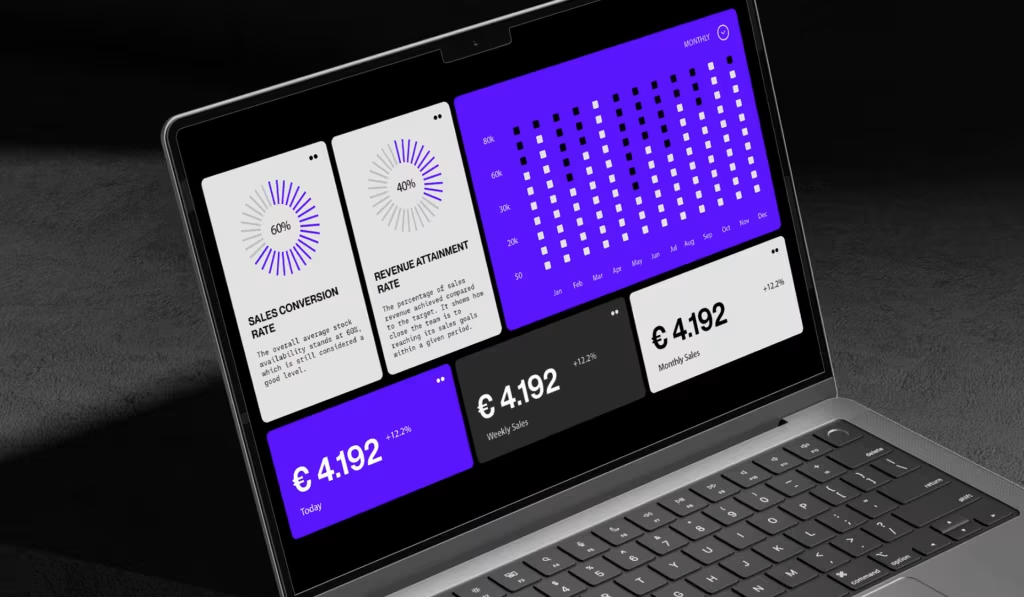
Reporting & Dashboards
The most important information at a glance. Nice reports that actually say something.
There are important insights somewhere in your Google Analytics or Google Ads account. Data about your customers, about your marketing performance, about opportunities and problems. But who has time to log into the dashboard every day and find out what the numbers mean? Correct: nobody. That's why we build reports and dashboards that do this for you. Data is automatically summarized, visualized and prepared - in a form that your team can use to make real decisions.
The problem with standard reports
Google Analytics, Google Ads, Social Media Dashboards – each platform has its own reports. The result: chaos. Your CEO looks at Google Ads, your content manager looks at GA4, the social media manager looks at Instagram Analytics. Nobody has a holistic overview. It takes hours to collect all the data. The numbers are often not comparable. And reports are compiled manually - prone to errors and expensive in man hours.
What you get
Executive Summary Dashboards
5-10 most important numbers at a glance. Trend information, budget vs. spent, ROI per channel - intended for decision makers. Weekly or Monthly.
Marketing Performance Reports
Traffic sources and their performance, conversion rate, CAC, ROAS, keyword performance. The KPIs your marketing team pays attention to.
Channel-Specific Reports
Google Ads: Spend, Clicks, Conversions, CPA. Social Media: Impressions, Engagements, CPM. SEO: Traffic, Rankings, Organic Conversions. Email: Open Rate, Click Rate. Each channel has its report.
Sales & Lead Intelligence Reports
Leads per source, lead quality, sales cycle length, pipeline value – intended for sales managers and sales teams.
Product & UX Reports
User Behavior, Conversion Funnel, Feature Usage, User Satisfaction – for Product and UX Designers.
Data Visualization & Design
Not tables with 100 rows. Line charts for trends, bar charts for comparisons, funnel charts for conversions. With the right visualization, stakeholders can see what's going on in seconds.
Insights & Annotations
Not just bare numbers - also an assessment. “That looks good” or “We need to make adjustments here.” “Traffic is +15% because we started a PR campaign” – Context is important.
Custom KPIs
CAC, ROAS, LTV, Payback Period, CAC Payback Ratio - metrics that answer real business questions.
Our process
-
1. Phase
Goals & Concept
Which KPIs are critical for you? Who needs which reports? What questions do we answer with the data?
-
2. Phase
Setup & Configuration
We connect your data sources (GA4, Google Ads, Social, etc.), build the data models, and configure the reports.
-
3. Phase
Testing & Validation
Is the data correct? Are the calculations correct? Does the automation work?
-
4. Phase
Reporting & Dashboards
We build dashboards and automated reports in Google Data Studio or Sheets.
-
5. Phase
Continuous optimization
If your priorities change or new channels emerge, we adapt the reports.
Who is this ideal for?
E-Commerce
AOV, Repeat Purchase Rate, Gross Profit vs. Ad Spend – you need to understand whether you are profitable.
SaaS & Subscription
MRR, Churn Rate, CAC vs. LTV, Growth Rate – metrics for scalability and profitability.
B2B Services
Lead Volume & Quality, lead-to-opportunity conversion, deal size, proposal-to-close rate – sales metrics that count.
Agency & Professional Services
Utilization Rate, Project Profitability, Bill Rate vs. Cost, Client Retention – specific metrics for service companies.
How much does it cost?
Basic Dashboard Setup
1,500-3,000 EUR
One or two dashboards with key metrics. Google Data Studio, automated, basic design.
Advanced Reporting (Multi-Dashboard + Custom KPIs)
3,000-7,000 EUR
Multiple dashboards for different roles, custom KPIs, insights and annotations, beautiful design.
Complete reporting system (dashboard + automated reports)
5,000-10,000 EUR
Dashboards, automated email reports, custom calculations, setup for self-service use by your team.
Ongoing support & Optimization
200-500 EUR/month
Monitoring of reports, error analysis, new KPIs if necessary, refinement based on feedback.
Why digitalists?
Project Manager = Developer
The guy who understands your business is also the guy who builds the reports. This ensures that the reports answer real business questions, not just pretty numbers.
Individual concepts
No standard report templates. We build reporting systems that exactly fit your KPIs and your culture.
Everything from a single source
Data source integration, data models, dashboards, automation, reporting – everything comes from us.
Experience since 2018
We have built reporting systems for dozens of companies. We know which reports work and which don't.
FAQs
We have so many data sources. How does this work together?
With proper data design this works. We build a single source of truth so that all dashboards are consistent.
Can we update the reports ourselves?
Yes, if you want. We build them so that technically savvy people can make small adjustments themselves. But you don't have to - we can manage everything too.
How often should reports be updated?
This depends on your needs. Strategic Reports: Monthly. Operational Reports: Weekly. Campaign reports: Sometimes Daily. We'll help you size it correctly.
Can we view the dashboards on our devices?
Yes, Google Data Studio is responsive and works on tablets and mobiles. You will receive automated reports by email and can view them anywhere.